
 ](https://immich-demo.note.sx/share/ffSw63qnIYMtpmg0RNvOui0Dpio7BbxsObjvH8YZaobIjIAzl5n7zTX5d6EDHdOYEvo)
- [About this project](#about-this-project)
- [Install with Docker](#how-to-install-with-docker)
- [How to use it](#how-to-use-it)
- [How it works](#how-it-works)
- [Additional configuration](#additional-configuration)
- [Feature requests](#feature-requests)
## About this project
[Immich](https://github.com/immich-app/immich) is a wonderful bit of software, but since it holds all your private photos it's
best to keep it fully locked down. This presents a problem when you want to share a photo or a gallery with someone.
**Immich Public Proxy** provides a barrier of security between the public and Immich, and _only_ allows through requests
which you have publicly shared.
It does this using the built-in sharing functionalty, so you don't need to make any changes to your sharing workflow.
It is stateless and does not know anything about your Immich instance. It does not require an API key which reduces the attack
surface even further. The only things that the proxy can access are photos that you have made publicly available in Immich.
### Features
- Supports sharing photos and videos.
- Supports password-protected shares.
- If sharing a single image, the link will directly open the image file so that you can embed it anywhere you would a normal image.
- All usage happens through Immich - you won't need to touch this app after the initial configuration.
### Why not simply put Immich behind a reverse proxy and only expose the `/share/` path to the public?
To view a shared album in Immich, you need access to the `/api/` path. If you're sharing a gallery with the public, you need
to make that path public. Any existing or future vulnerability has the potential to compromise your Immich instance.
For me, the ideal setup is to have Immich secured privately behind mTLS or VPN, and only allow public access to Immich Public Proxy.
Here is an example setup for [securing Immich behind mTLS](./docs/securing-immich-with-mtls.md) using Caddy.
## How to install with Docker
1. Download the [docker-compose.yml](https://github.com/alangrainger/immich-public-proxy/blob/main/docker-compose.yml) file.
2. Create a `.env` file to configure the app:
```
IMMICH_URL=http://localhost:2283
PORT=3000
CACHE_AGE=2592000
```
- `IMMICH_URL` is the URL to access Immich in your local network. This is not your public URL.
- `PORT` is the external port you want for the docker container.
- `CACHE_AGE` this is setting the Cache-Control header, to tell the visitor's browser to cache the assets. Set to 0 to disable caching. By default this is 30 days.
3. Start the docker container:
```bash
docker-compose up -d
```
4. Set the "External domain" in your Immich **Server Settings** to be the same as the `PROXY_PUBLIC_URL`:
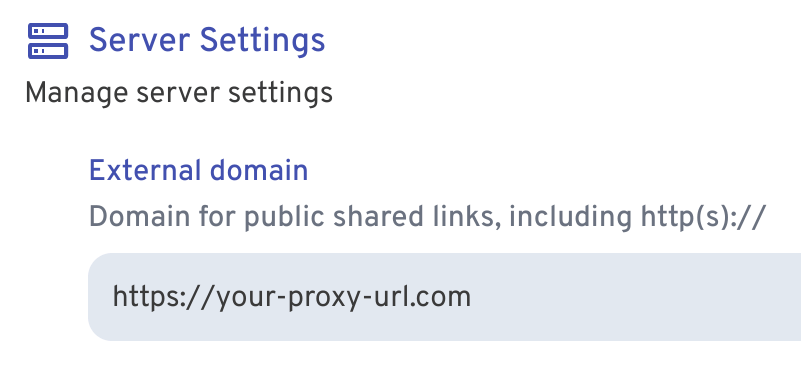 Now whenever you share an image or gallery through Immich, it will automatically create the
correct public path for you.
## How to use it
Other than the initial configuration above, everything else is managed through Immich.
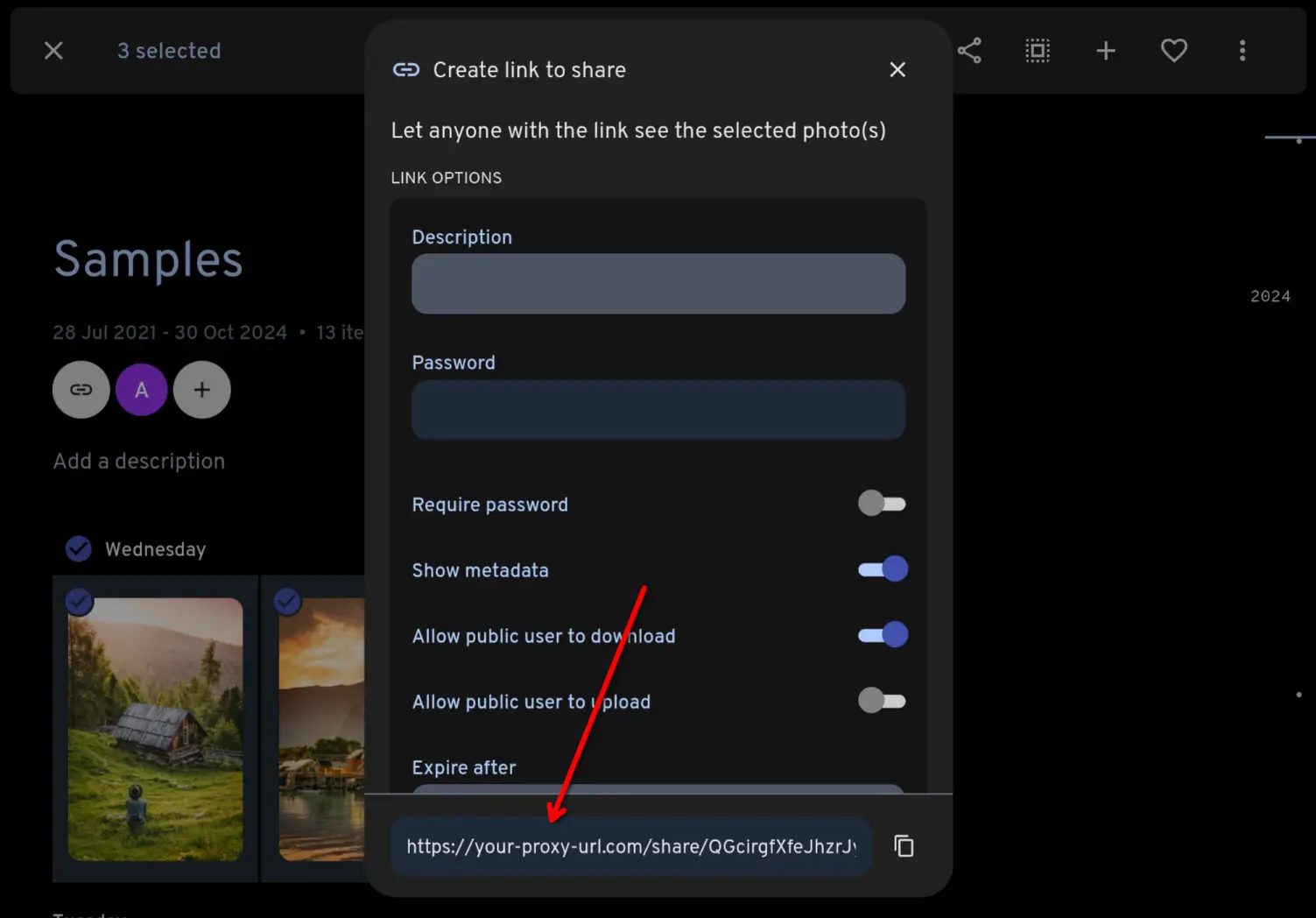
You share your photos/videos as normal through Immich. Because you have set the **External domain** in Immich settings
to be the URL for your proxy app, the links that Immich generates will automaticaly have the correct URL:
 ## How it works
When the proxy receives a request, it will come as a link like this:
```
https://your-proxy-url.com/share/ffSw63qnIYMtpmg0RNvOui0Dpio7BbxsObjvH8YZaobIjIAzl5n7zTX5d6EDHdOYEvo
```
The part after `/share/` is Immich's shared link public ID (called the `key` [in the docs](https://immich.app/docs/api/get-my-shared-link)).
**Immich Public Proxy** takes that key and makes an API call to your Immich instance over your local network, to ask what
photos or videos are shared in that share URL.
If it is a valid share URL, the proxy fetches just those assets via local API and returns them to the visitor as an
individual image or gallery.
If the shared link has expired or any of the assets have been put in the Immich trash, it will not return those.
## Additional configuration
The gallery is created using [lightGallery](https://github.com/sachinchoolur/lightGallery). You can adjust various settings to customise how your gallery displays.
1. Make a copy of [config.json](https://github.com/alangrainger/immich-public-proxy/blob/main/config.json) in the same folder as your `docker-compose.yml`.
2. Pass the config to your docker container by adding a volume like this:
```yaml
volumes:
- ./config.json:/app/config.json:ro
```
3. Restart your container and your custom configuration should be active.
You can find all of lightGallery's settings here:
https://www.lightgalleryjs.com/docs/settings/
For example, to disable the download button for images, you would change `download` to `false`:
```json
{
"lightGallery": {
"controls": true,
"download": false,
"mobileSettings": {
"controls": false,
"showCloseIcon": true,
"download": false
}
}
}
```
## Feature requests
You can [add feature requests here](https://github.com/alangrainger/immich-public-proxy/discussions/categories/feature-requests?discussions_q=is%3Aopen+category%3A%22Feature+Requests%22+sort%3Atop),
however my goal with this project is to keep it as lean as possible.
Due to the sensitivity of data contained within Immich, I want anyone with a bit of coding knowledge
to be able to read this codebase and fully understand everything it is doing.